Human-in-the-loop for agent tool calls: designing approvals people will actually use
What to hold for approval, who may approve, what the reviewer and the agent see, how long to wait, how a live review page stays correct across replicas, and how every decision is audited. Design notes from Neurouter's MCP gateway.
The MCP specification is clear about intent: "there SHOULD always be a human in the loop with the ability to deny tool invocations". Clients implement this as a confirmation prompt, shown to the person who started the agent. That's consent, and it's useful. It isn't oversight: the person approving is the person who wants the result, the prompt arrives in the middle of their flow, and they can turn it off.
For a small set of actions, organizations want something else: a different person, with the authority to say no, looking at the exact call before it runs. That's what approvals in Neurouter are for. This post walks through the design decisions, including the ones we're not finished with.
1. What to hold
Approval is expensive: it costs a person's attention and stalls an agent. Hold as few tools as you can, and choose them by consequence and reversibility, not by how dangerous they sound.
| Good candidates | Usually not worth holding |
|---|---|
| Merging or deploying to production | Reading code, docs or tickets |
| Writing to production databases | Queries against analytics replicas |
| Sending email or messages to people outside the team | Posting to the agent's own scratch channel |
| Changing permissions, users or secrets | Creating a draft that a person reviews anyway |
| Moving money; bulk exports of personal data | Anything an agent calls dozens of times an hour |
In Neurouter an admin, or the owner of the server, flags a tool as requires approval. We deliberately don't infer this from the tool's own annotations, such as destructiveHint: the specification says clients "MUST consider tool annotations to be untrusted unless they come from trusted servers", and a server that wants to avoid review would simply not set them.
The hold happens after access control, argument validation against the pinned schema and rate limits. A reviewer never sees a call that would have been refused anyway.
2. Who may approve
Admins and the owners of the tool's server. Auditors can see approvals but not decide. By default, the user an agent acts for cannot approve calls made by their own agents, including a CI agent they own; an admin can change that with Allow self-approval in the gateway settings.
A decision is a single atomic update: it succeeds only if the approval is still pending and hasn't expired. A second reviewer clicking a moment later gets 409 ("already approved"); a reviewer clicking after expiry gets 410. Denying requires a reason.
3. What the reviewer sees
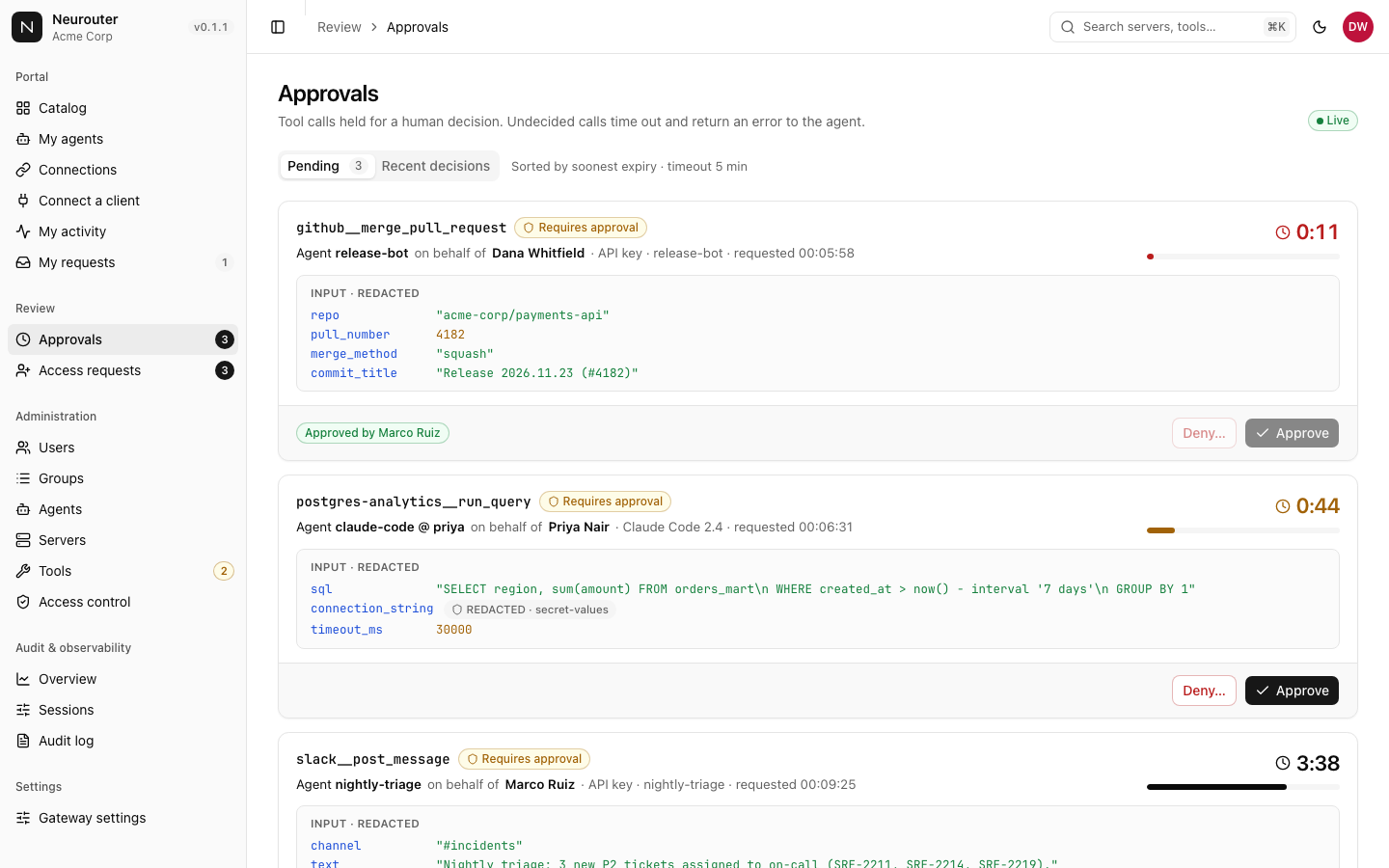
Each held call shows the agent, the user it acts for, the client and version or the API key, the qualified tool name, the arguments, and a countdown. Two choices here are worth explaining:
- Arguments are redacted with the audit log's rules before they're stored or shown. The reviewer sees what the audit log will contain, never a raw secret. The trade-off: if a rule hides a value the reviewer needed, they have to deny and ask.
- The arguments are frozen. When a call is held, Neurouter stores the redacted arguments for display and a SHA-256 hash of the full arguments. On approval, the gateway executes the arguments it has been holding in memory for that request. Nothing can be swapped in between the review and the execution.
4. How long to wait
The default timeout is 5 minutes, the maximum is 15, and a tool can override the default within that maximum. Holding a call means holding an HTTP request open while an agent session waits, and a decision made an hour later is a decision about a stale context. If an action genuinely needs a next-day sign-off, a held tool call is the wrong shape; make the agent create a request in the system where approvals already live.
Clients have their own timeouts. The MCP lifecycle says implementations "MAY choose to reset the timeout clock when receiving a progress notification", while still enforcing a maximum. So if the client sends a progressToken, Neurouter sends a progress notification every 10 seconds while the call is held:
{
  "method": "notifications/progress",
  "params": {
    "progressToken": "call-17",
    "progress": 40,
    "total": 300,
    "message": "Waiting for human approval (id 01a2…); times out in 5m"
  }
}
If the client gives up anyway, the cancellation reaches the gateway, the approval is marked cancelled, and nothing runs.
5. What the agent sees
The agent learns about approvals early: search_tools marks such tools "(requires approval)", so a well-behaved agent can tell its user before it calls one. When the hold ends without approval, the agent gets a tool error result (isError: true), which the specification says clients should pass to the model "to enable self-correction":
| Outcome | Result text |
|---|---|
| Denied | Denied by Marco Ruiz: use the staging replica for this query |
| Timed out | Approval timed out after 5m; nobody approved the call to postgres-analytics__run_query |
| Cancelled | The client cancelled the request while it was waiting for approval |
The denial reason goes back to the model. Write it for the model: "use the staging replica" lets the agent recover; "no" makes it guess.
6. A live review page that stays correct
The approvals page is fed by server-sent events from GET /api/approvals/stream, with three event types: approval.created, approval.resolved and approval.expired. A few details make it reliable rather than just live:
- Each event's id is
<updatedAtMs>:<approvalId>. When the browser reconnects, it sendsLast-Event-IDand the server replays every change the viewer is allowed to see since then, so a dropped connection doesn't lose an approval. - A keep-alive comment every 15 seconds survives load balancers with 60-second idle timeouts, and the response sets
X-Accel-Buffering: no. Your ingress still needs buffering off and long read timeouts; the Helm chart's NGINX annotations do both. - Each replica keeps one subscription and filters per viewer: owners see their servers' approvals, people see their own agents' calls, admins and auditors see everything.
Behind the page, a held call can be decided on any replica. The holding replica waits for a signal on a per-approval channel, with a database poll every two seconds as the correctness fallback, and heart-beats the row every 15 seconds. If a replica dies, a janitor marks its held approvals abandoned after 60 seconds without a heartbeat, and nothing runs. During rolling updates, the Helm chart sets the pod's termination grace period to the maximum approval timeout plus 30 seconds.
7. Every decision is evidence
One approved call produces three audit records:
- the
tool_callrow with decisionapproval_pending, written when the hold starts; - the reviewer's decision (
approval.approveorapproval.deny, with the note or reason, their IP and user agent); - the final
tool_callrow with decisionapproved,approval_denied,approval_timeoutorapproval_cancelled, and the call's outcome.
The two tool_call rows share the call's request and trace IDs, the decision row names the approval (which records the same request ID), and all three sit in the same hash-chained log. Prometheus gets neurouter_approvals_pending and neurouter_approval_wait_seconds by outcome, which tells you whether approvals are slowing people down.
What we haven't solved
No notifications yet. In v0.1.1 there are no email, Slack or push notifications for new approvals; reviewers see them on the live page and as a badge in the console. Until that changes, alert on the gauge with Alertmanager:
- alert: NeurouterApprovalWaiting
  expr: max(neurouter_approvals_pending) > 0
  for: 30s
Synchronous only. Fifteen minutes is the ceiling. There's no queue that survives the agent's session.
Per tool, not per argument. You can't yet say "hold
run_queryonly when it touches thepaymentsschema".Rubber-stamping. A reviewer who approves everything adds latency, not safety. Watch the approve/deny ratio and the wait times, and remove holds that never get denied.
Reviewers see the call, not the conversation. They judge the action on its arguments and the agent's identity, not on the prompt that led to it.
Try it
The live demo simulates held calls arriving and timing out in your browser. The implementation is in apps/server/src/policy/approvals in the GitHub repository. Setup details are in the approvals documentation, and the feature summary is at Human approvals.